Quick answer
An earbud can have several small meshes, including a speaker outlet, microphone covers and pressure vents. They do not all serve the same purpose or tolerate the same treatment. A removable silicone tip may also contain a separate protective screen. Before cleaning, identify the earbud model and compare its visible openings with the manufacturer's illustrations. Do not assume every dark circle is a speaker or that a screen should be removed.
Sa artikulong ito
- Know which surface you are trying to clean
- Prepare the earbuds and workspace
- Treat removable ear tips as separate parts
- Use model-specific mesh instructions, not a generic recipe
- Avoid adhesive, pressure and improvised disinfection
- Allow complete drying before listening or charging
- Retest carefully and maintain without overcleaning
- Sources
Know which surface you are trying to clean
An earbud can have several small meshes, including a speaker outlet, microphone covers and pressure vents. They do not all serve the same purpose or tolerate the same treatment. A removable silicone tip may also contain a separate protective screen. Before cleaning, identify the earbud model and compare its visible openings with the manufacturer's illustrations. Do not assume every dark circle is a speaker or that a screen should be removed.
Wax and skin oil can reduce the clarity of an obstructed outlet, but dull sound also has other causes. Check fit, battery status, audio balance and the selected output first. Compare familiar speech at a comfortable level rather than starting with a loud tone. If only one app sounds poor, try another source. Cleaning is appropriate when the exterior needs it; it should not become an automatic response to every connection, fit or recording problem.
Prepare the earbuds and workspace
Take the earbuds out of your ears and keep them out of the charging case while working. Disconnect them or stop playback so unexpected sound cannot start. Use a clean, well-lit surface where tiny removable parts will not roll away. Wash and dry your hands, and set aside a soft, lint-free cloth. Any brush used must be clean, appropriately soft and compatible with the manufacturer's procedure.
Keep household sprays, solvents and drinks away from the work area. A brush previously used with toothpaste, cosmetics or cleaning chemicals can transfer residue even if it looks dry. Do not use a metal pick, pin or toothpick to open holes in the mesh. The mesh may be part of an acoustic or protective assembly, and puncturing it can create a permanent problem. If it is torn, detached or pushed inward, stop cleaning and ask about repair or replacement.
Treat removable ear tips as separate parts
Remove a tip only if it is designed to be user-removable, following the manufacturer's grip and removal instructions. For AirPods Pro, Apple says to pull from the base where the tip attaches, rather than yanking the thin rim. Inspect the detached tip for blocked openings, tears or stretching. A damaged tip can change fit and bass response even when the underlying speaker is clean. apple.com guidance
Apple allows detached AirPods Pro tips to be rinsed with water without soap or other household cleaners, then dried completely before reattachment. That permission applies to those tips, not to the assembled electronic earbud. Foam tips and tips from other brands may need different care and may not tolerate rinsing. Do not wash every tip according to an AirPods example. Reattach only dry parts, confirm a secure fit and replace a deteriorated tip rather than trying to restore it with chemicals. apple.com guidance
Use model-specific mesh instructions, not a generic recipe
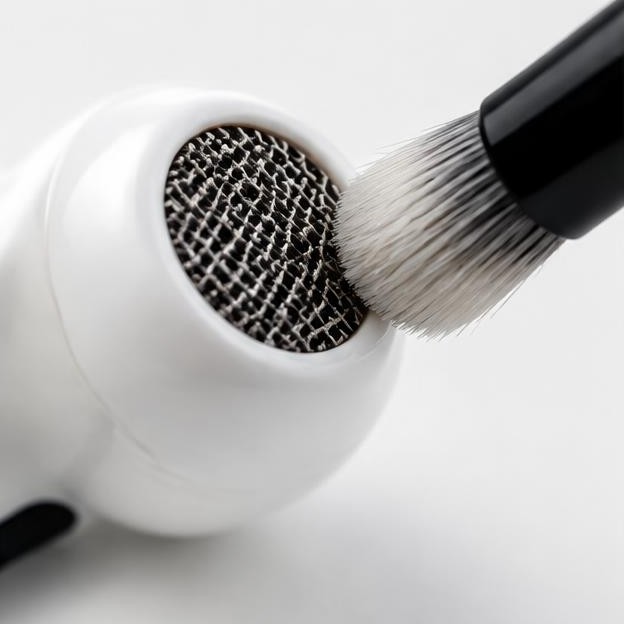
Begin with the least invasive action permitted by the manufacturer, such as wiping the exterior with a soft, dry cloth. Where dry brushing is explicitly supported, use light surface strokes without forcing bristles through the screen. Hold the earbud securely and stop often to inspect. Material that does not lift easily may need a different approved procedure or professional attention rather than more pressure.
Apple now publishes specific mesh-cleaning procedures for supported AirPods models, with illustrations identifying the areas that may be cleaned, specified materials and a drying requirement. Those instructions are not interchangeable across every generation or with third-party earbuds. If your model is covered, read the complete current procedure before beginning rather than copying one step from a summary. Do not substitute household cleansers, pour liquid into openings or extend a mesh procedure to charging ports and contacts. If the illustrations do not match your device, stop and identify it correctly. apple.com guidance apple.com guidance
Avoid adhesive, pressure and improvised disinfection
Sticky putty and tape may appear to lift wax, but they can leave residue or pull on delicate screens. Compressed air and strong suction can also disturb protective parts or move debris deeper. Avoid these methods unless the manufacturer specifically authorizes them for the exact product. Do not scrape a hardened deposit with a blade or use a rotating tool, even when the mesh looks metallic.
Disinfection and acoustic cleaning are different tasks. A product suitable for an outer plastic surface may be unsuitable for a mesh, membrane or adhesive joint. Do not drip alcohol, peroxide, soap or another cleaner into a sound outlet. Do not try to sterilize earbuds in boiling water, a dishwasher or a microwave. If you have irritation or an ear infection, stop sharing or wearing the earbuds and seek appropriate health advice; aggressive cleaning of the device is not a substitute for assessing the cause.
Allow complete drying before listening or charging
If an approved cleaning procedure involves moisture, follow its complete drying instructions. Apple's supported AirPods mesh procedures specify drying completely for at least two hours before use or placement in the charging case. A surface that feels dry is not necessarily ready earlier, especially around seams or screens. Do not accelerate drying with a hair dryer, radiator or hot sunlight. apple.com guidance
Keep earbuds on a clean surface in a ventilated room and prevent dust from settling on freshly cleaned openings. Dry removable tips separately. Do not put damp earbuds into a powered case, and do not use a water-eject tone as evidence that charging is safe. Tones cannot verify internal dryness or remove oily deposits. If the case itself was exposed to liquid, treat that as a separate electronics problem and keep it disconnected from power until the manufacturer's guidance allows use. Do not probe its charging wells with damp tools.
Retest carefully and maintain without overcleaning
Once everything is fully dry and correctly assembled, repeat the same short recording at the original comfortable level. Check clarity, fit and left-right balance. If the result is unchanged, do not automatically repeat a wet procedure or use stronger pressure. The cause may be fit, settings, a microphone or driver fault, or contamination that requires service. Seek help for persistent distortion, substantial imbalance, visible mesh damage or symptoms following immersion.
For routine care, wipe the exterior after exercise, keep the case interior free of loose debris and store only dry earbuds. Inspect tips periodically and replace damaged ones with compatible parts. Do not clean deeply on a rigid schedule if no debris is present; unnecessary handling can create wear. Record which procedure you used and whether it helped, particularly before requesting service. A successful cleaning leaves intact protective parts and normal sound, not simply a mesh that looks polished under a bright light.
Sources
Apple manufacturer guidance: apple.com guidance ; apple.com guidance ; apple.com guidance