Ebben a cikkben
- Quick answer
- Choose a scene that reveals the issue
- Verify that the center is configured correctly
- Get the speaker out of its acoustic hiding place
- Check the effect of your seat
- Raise center trim conservatively
- Use bass management and compression appropriately
- Inspect connections and previous calibration
- Know when a different solution is needed
- Sources
Quick answer
First confirm that your receiver recognizes a center speaker and that the selected soundtrack actually contains a center channel. Bring the speaker to the front edge of its shelf, aim it toward seated listeners, and remove obstructions. Then try a small center-level increase, such as one or two decibels, while replaying the same dialogue scene.
If dialogue is clear but explosions are overwhelming, use the receiver's documented dynamic-range or night mode rather than simply raising the master volume. If the center is almost silent, investigate configuration and wiring before adding gain. A stereo soundtrack, an incorrect speaker layout, or a blocked center can each resemble a level problem.
Choose a scene that reveals the issue
Select a familiar scene with ordinary conversation and little background music. Compare it with a second program from another app or input. If only one production has difficult dialogue, the mix or selected language track may be responsible. Check whether you accidentally selected audio description, a commentary track, or a different soundtrack format.
Keep the master volume unchanged during comparisons and disable temporary sound effects that make the result hard to interpret. Note whether words are merely quiet, muffled, or missing altogether. Those symptoms point toward different solutions. Quiet but clear speech often benefits from level or dynamic-range adjustments; muffled speech frequently calls for placement or tonal checks.
Verify that the center is configured correctly
Open the receiver's speaker configuration and confirm that the center is enabled when one is physically connected. Check the displayed input format during a known multichannel program. A streaming app may deliver stereo because of its own settings, the television's output configuration, or limitations in the connection path. The receiver cannot recover a missing discrete channel simply by increasing its trim.
Use the receiver's documented channel-identification function briefly and at a comfortable level. It should identify the physical center, not a front speaker or surround. This is a routing check, not a calibrated measurement. If the wrong speaker plays, stop and correct the configuration or wiring with the amplifier powered off.
Get the speaker out of its acoustic hiding place
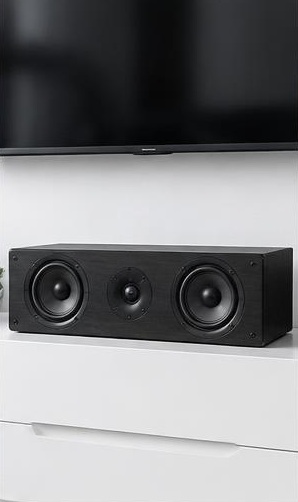
A center recessed deeply inside a television cabinet can sound cloudy because nearby surfaces reflect its output. Move the front baffle toward the shelf's front edge where safe. Keep cabinet doors open during testing, and remove ornaments, game consoles, or soundbar-shaped objects that block the drivers. Ensure the port and ventilation clearances remain suitable.
Aim the speaker toward the listening area using a stable manufacturer-compatible support. A center below the screen often needs a modest upward angle, but do not balance it precariously on improvised wedges. Confirm that the support cannot slip. Avoid placing the cabinet where it covers the television's ventilation, sensors, or an unstable section of furniture.
Check the effect of your seat
Listen from the central seat, then move to the seats where dialogue is hardest to understand. Some horizontal center designs change noticeably away from their preferred listening axis. If the middle seat sounds clear but a side seat sounds hollow, raising the channel level may make the middle excessively loud without fixing the tonal change.
Try modest placement or aiming adjustments that cover the most important seats. Avoid rotating a speaker vertically unless the manufacturer permits that orientation and the installation is secure. If wide seating coverage remains poor, the limitation may be the speaker's dispersion rather than a receiver fault. Document which seats are affected before considering equipment changes.
Raise center trim conservatively
Once routing and placement are correct, increase center trim in small steps while comparing the same scene. Start with one or two decibels rather than a large jump. Check that voices remain natural and centered and that music or effects assigned to the center do not become disproportionately prominent.
Many receivers offer both a persistent channel trim and a temporary dialogue-level adjustment. Learn which control you are changing so settings do not accumulate unnoticed. If you need an unusually large boost, revisit the wiring, speaker distance, calibration results, and physical placement. Large compensation can conceal a fault and may reduce available headroom during demanding scenes.
Use bass management and compression appropriately
Check the center's bass-management setting against its capabilities and the receiver manual. With a capable subwoofer present, an appropriate crossover can reduce deep-bass demands on a compact center. Do not select a setting merely because the speaker cabinet looks large, and do not assume the word Small means poor quality.
Dynamic-range control serves a different purpose: it reduces the gap between quieter and louder material. This can make late-night listening more practical without extreme center boosts. Feature names and compatibility vary by codec and receiver. Try one processing change at a time, and compare both a conversation scene and a busier scene before deciding whether it helps.
Inspect connections and previous calibration
Power the receiver off before checking the center cable. Confirm a secure connection at both ends, consistent polarity, and no stray strands. If the speaker has multiple terminal pairs, verify any required links. Do not work on wiring while the amplifier is running, and do not connect two amplifier channels to the center.
Review automated setup results for implausible distances, extreme trims, or an incorrectly detected missing speaker. If you moved the center, rerun setup according to the manufacturer's microphone instructions. Use the supplied microphone and recommended positions. A phone listening app is not a substitute for the receiver's calibration system and cannot certify that all channels have matched output.
Know when a different solution is needed
If the center remains faint on every source while the other speakers work normally, use the manufacturer's diagnostic process or request service. A quiet tweeter, damaged crossover, or amplifier-channel fault is not corrected by a dialogue enhancer. Stop if you hear crackling, smell overheating, or see protection warnings.
If the hardware works but comprehension remains difficult across television, conversation, and other listening situations, subtitles, assistive-listening options, or a hearing assessment may be more helpful than repeated equipment changes. For a system without a physical center, configure the receiver accordingly so dialogue is redirected to the front pair rather than sent to an absent speaker.
Sources
Check the receiver's own instructions for speaker configuration, channel trim, dynamic-range control, bass management, and automatic setup. Speaker orientation and mounting guidance should come from its manufacturer.
Official support and manuals: denon.com guidance ; kef.com guidance ; svsound.com guidance