ಈ ಲೇಖನದಲ್ಲಿ
- Quick answer
- Define what sounds quieter
- Remove source and software imbalance first
- Make the listening geometry fair
- Compare the surrounding boundaries
- Use a safe channel-swap comparison
- Separate a cabinet problem from a location problem
- Inspect connections and driver output gently
- Apply balance only after the cause is understood
- Sources
Quick answer
Set balance to the center, disable unusual processing, and play a familiar mono voice recording. Sit equally far from both speakers and compare each side separately at a comfortable level. If the imbalance changes when you move your head or seat, investigate placement and nearby surfaces before adjusting channel gain.
If one side remains quieter across positions and sources, use controlled swaps to separate the speaker from the electronics. Power down before changing cables, label every connection, and alter one variable at a time. Do not immediately compensate with balance: a room-related bass dip, a loose connection, and a failing tweeter require different solutions.
Define what sounds quieter
Decide whether the entire speaker seems lower in level or whether only bass, voices, or treble is reduced. A speaker beside an open doorway may lose apparent bass weight compared with one near a corner. A blocked tweeter can make a speaker seem quiet even when its bass output is normal.
Compare more than one recording, including straightforward mono material. Stereo mixes often place instruments deliberately to one side, so a single song is not a dependable balance reference. Note whether the central voice pulls consistently in the same direction. Keep the volume fixed during comparisons, and avoid interpreting a difference in tonal character as proof of a broad level mismatch.
Remove source and software imbalance first
Check operating-system balance, player settings, amplifier balance, and any accessibility or hearing-personalization controls. Some applications store their own channel settings. Disable spatial effects or room profiles temporarily, then test another source connected through a different input if available.
If the issue occurs only with one app or device, the speakers may be fine. Check that an adapter is fully inserted and that the source is not using a microphone-style connection incorrectly. A partially seated connector can change channel level or cancel shared content. Restore normal settings systematically rather than applying an opposite adjustment somewhere else, which can hide the original cause.
Make the listening geometry fair
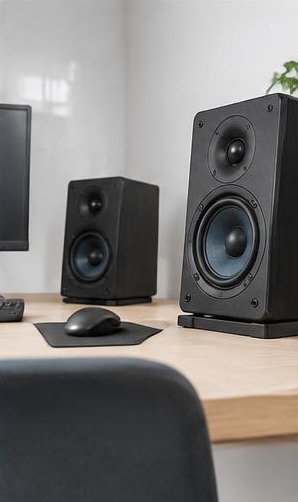
Measure from each speaker's front area to the listening position. A desk chair that looks centered may be noticeably closer to one speaker. Position the speakers at comparable heights and angles, following their intended orientation. Keep computer monitors, lamps, and shelving from blocking one side.
Move your head a short distance left, right, forward, and backward while ordinary music plays quietly. If the apparent imbalance changes sharply, reflections or cancellations are likely involved. This does not rule out every hardware issue, but it shows that a single fixed balance setting may not solve the whole problem. Evaluate the actual seat rather than standing halfway between the cabinets.
Compare the surrounding boundaries
Look for unequal side walls, windows, curtains, alcoves, and open doorways. One speaker close to a corner can have stronger bass than its partner in open space. A large reflective surface beside one cabinet can also alter clarity and apparent loudness without changing the amplifier's electrical output.
Try modest placement changes before adding processing. Move a speaker away from the nearest side boundary, clear a reflective obstruction, or make the two arrangements more similar where practical. Keep notes and preserve safe cable slack. Do not expect thin decorative foam to correct deep-bass room effects. The most useful change may be moving the listening seat rather than the speakers.
Use a safe channel-swap comparison
For passive speakers, switch the amplifier off before exchanging the left and right speaker connections at the amplifier. Keep polarity correct and ensure no strands bridge terminals. Replay the same mono passage after powering up. If the quieter physical speaker changes sides electrically, the result helps locate the fault in the upstream channel or downstream speaker path.
Interpret the setup carefully: swapping amplifier outputs does not move the cabinets or change the room. If the same physical cabinet remains quieter, its cable, speaker, or surroundings remain suspect. If the quietness transfers to the other cabinet, investigate the amplifier or source. Do not perform this test on proprietary powered-speaker interconnects unless the manual allows it.
Separate a cabinet problem from a location problem
If the speakers are small enough to move safely, exchanging their physical positions can provide another useful comparison. Power down, label cables, and restore similar height and angle at each location. Do not attempt this alone with heavy floorstanders or fragile stands. Skip the test if safe handling is uncertain.
A symptom that follows the cabinet suggests a speaker or cabinet-specific setting. A symptom that stays with the location suggests the room, cable route, or electronics feeding that location. Powered speakers may have independent gain or boundary switches, so compare those settings before assuming damage. Record exactly what moved; an uncontrolled swap of cabinets, cables, and inputs can make the result ambiguous.
Inspect connections and driver output gently
With power off, inspect terminals, cable plugs, and any bi-wire links. Look for loose connections, damaged cables, or incorrect input settings. During quiet playback, listen from a sensible distance for an obvious missing frequency range. Do not put your ear directly against a driver or touch a cone to check whether it moves.
A missing tweeter or intermittent connection deserves service, not a large treble boost or balance correction. Stop if there is crackling, scraping, overheating, or amplifier protection. A phone recording may help describe the difference to support, but automatic microphone processing means it cannot establish an accurate channel-level mismatch. Treat it as communication, not calibrated evidence.
Apply balance only after the cause is understood
If both channels function correctly and the room cannot be made symmetrical, a small balance adjustment may be a practical final compromise. Evaluate voices and several music selections from the main seat. Remember that a broad balance change affects all frequencies, so it cannot precisely correct a bass-only room problem.
Save the original setting and document the final position. If the imbalance is new or worsening, continue investigating rather than treating compensation as a permanent repair. If the effect follows you across unrelated systems or remains when the equipment is reversed, consider whether hearing differences are contributing. Equipment troubleshooting is useful, but it is not a substitute for appropriate hearing advice.
Sources
Use the exact equipment manuals for balance controls, speaker wiring, powered-speaker gain settings, and approved placement. Safe swap procedures depend on the type of system.
Official manufacturer resources: denon.com guidance ; kef.com guidance ; genelec.com guidance