यस लेखमा
- Quick answer
- Identify the exposure and the exact model
- Understand what a charging warning means
- Dry the exterior without forcing water inward
- Treat salt, chlorine, and sticky liquids differently
- Inspect the cable and charger as separate components
- Resume charging only after the care conditions are met
- Escalate persistent warnings and prevent another exposure
- Sources
Quick answer
Stop charging a portable speaker with a wet charging port. If the cable, charger, or surrounding area is wet, disconnect mains power only when you can do so safely with dry hands and without touching wet electrical equipment. Move the speaker to a dry location, switch it off using its normal procedure, and wipe exterior moisture with a soft cloth. Follow the exact model's drying and contamination instructions before reconnecting anything.
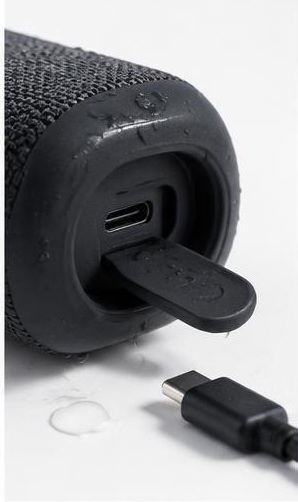
Do not insert tools, force charging past a warning, or assume that a waterproof enclosure makes its connector safe to energize. JBL explicitly requires the charging port to be completely dry before power is connected on its listed models. jbl.com guidance A dry-looking rim, restored sound, or disappearance of visible droplets does not establish that the recess, cable plug, and internal contact area are ready.
Identify the exposure and the exact model
Find the model name on the label, purchase record, or companion app without powering the device unnecessarily. Read the sections covering water resistance, USB charging, port covers, and cleaning. Two speakers from the same brand can have different connector arrangements and permitted care procedures. A rubber flap may be required for water resistance on one product, while another has an exposed connector designed with different limitations.
Record whether the port encountered fresh water, pool water, seawater, a drink, or cleaning liquid. Fresh moisture and dried contamination are different problems. Sugary drinks can leave sticky deposits, while salt and pool chemicals can remain after water evaporates. Also note whether charging was active during exposure, whether the cable plug became wet, and whether an alert appeared. These details help support determine whether ordinary drying is an adequate next step.
Understand what a charging warning means
Some speakers detect conditions associated with moisture or contamination and respond with flashing lights or an alert. JBL describes a USB-C protection feature on specified models that can react to water, salt, or another chemical. Its guidance is to remove the charging cable, wipe excess moisture around the port, and allow complete drying. jbl.com guidance The warning is a protective interruption, not an invitation to keep trying different chargers.
An alert does not identify the contaminant precisely or certify the absence of internal damage. Conversely, a speaker without a warning system still needs a dry connector. Do not test whether protection works by deliberately wetting a port. If a warning returns after an apparently dry interval, consider remaining contamination or damage and consult support rather than repeatedly reconnecting power to see whether the alert eventually stops.
Dry the exterior without forcing water inward
Blot accessible exterior moisture with a clean, soft, lint-free cloth. Follow the manual's orientation and port-cover instructions, and leave the speaker in a dry, ventilated room. Keep the charging connector away from damp towels and wet surfaces. A cloth used for the initial wipe should be replaced if it becomes saturated, otherwise it can keep moisture against the opening instead of removing it.
Avoid hair dryers, ovens, radiators, direct sunlight, compressed air, and vigorous shaking. Heat can affect seals and batteries; pressure can move liquid into places you cannot inspect. Do not pack the port with rice, paper, or loose absorbent material. There is no universal waiting period that applies to every speaker, exposure, and room condition. Use the manufacturer's criteria and ask support when the port remains uncertain or the exposure exceeded the product's stated limits.
Treat salt, chlorine, and sticky liquids differently
Evaporation removes water but does not necessarily remove dissolved material. If seawater, pool water, sunscreen runoff, or a drink reached the connector, identify the manufacturer's contamination procedure. Do not automatically rinse a USB opening because another waterproof product permits rinsing its exterior. Approved cleaning methods can differ even between parts of the same speaker, and a damaged seal changes the risk further.
Some manufacturers publish product-specific connector cleaning procedures involving particular materials. Those are not universal permission to insert swabs, metal picks, alcohol, or other chemicals into every port. For an unidentified model, or one without clear instructions, contact support and describe the liquid involved. Keep the unit disconnected while awaiting advice. If deposits are visible deep inside the connector, or the plug no longer seats normally, professional assessment is safer than improvised scraping.
Inspect the cable and charger as separate components
The speaker may dry while its cable plug remains damp or contaminated. Keep that cable disconnected and inspect it under good light without inserting anything into either connector. Look for discoloration, residue, bent contacts, damaged insulation, or corrosion. A charger that became wet requires its own manufacturer's safety guidance; drying the speaker does not make wet mains-powered equipment safe to reuse.
Before any eventual charging attempt, confirm that the speaker, its port, and the chosen cable meet the applicable dry-and-clean requirements. Use a compatible, undamaged charger and cable specified or accepted by the manufacturer. Do not rotate through higher-powered adapters as a way to overcome a moisture warning. Power capability does not remove contamination, and a successful electrical connection is not proof that charging was appropriate.
Resume charging only after the care conditions are met
When the manufacturer says charging is appropriate and the connector and cable are fully dry and clean, reconnect in a dry indoor location where you can observe the speaker. Do not leave the first post-exposure charge unattended. If an alert, abnormal heat, odor, unstable charging, or repeated disconnects occur, stop and contact support. Do not interpret intermittent charging as a reason to wiggle or force the connector.
If the speaker will not turn on because its battery is empty, avoid using charging as an early diagnostic shortcut while moisture is uncertain. A depleted battery does not override the port's drying requirements. Likewise, playing a water-ejection sound cannot establish charging safety: acoustic motion at the speaker grille does not inspect or reliably dry USB contacts. The decision to reconnect power must come from the model's care instructions, not a sound test.
Escalate persistent warnings and prevent another exposure
Request service for recurring protection alerts, visible corrosion, a loose connector, liquid exposure while charging, or behavior suggesting internal damage. Stop using a speaker with swelling, burning odor, smoke, or abnormal heat, and follow manufacturer and local emergency guidance as appropriate. Do not open the enclosure to inspect the battery or accelerate drying. Opening it can introduce additional hazards and compromise remaining water resistance.
For future use, charge in a dry place before heading outdoors, keep port covers correctly closed where required, and store cables separately from wet towels or swimwear. After an outing, inspect the connector before plugging in automatically. Keep a brief record of the exposure and subsequent symptoms for support. These habits prevent a common mistake: assuming that a speaker suitable for poolside listening is also suitable for immediate poolside charging.
Sources
JBL, charging a speaker after wet exposure: jbl.com guidance
JBL, USB-C charging protection warnings: jbl.com guidance