В этой статье
- Quick answer
- Separate muffled speech from a quiet mix
- Give every driver a clear path
- Prevent two systems from competing
- Start from a predictable sound mode
- Reduce masking bass before boosting treble
- Check the format without chasing badges
- Use night mode for large volume swings
- Reset selectively and escalate sensibly
- Sources
Quick answer
Move the soundbar out from a recessed shelf, remove anything blocking its front or upward-facing drivers, and make sure the television speakers are not playing simultaneously. Select the correct language soundtrack, switch to the soundbar's standard mode, and compare a familiar dialogue scene. Then try the manufacturer's speech-enhancement setting and a modest bass reduction.
If voices are present but cloudy, placement and tonal balance deserve attention before volume. If voices are missing, severely hollow, or affected only on one source, check the television's audio format and the soundbar's supported formats. Change one setting at a time so you can identify the improvement instead of stacking several unknown effects.
Separate muffled speech from a quiet mix
Muffled speech loses consonant detail and sounds as though it is coming through a covering. Quiet dialogue can remain perfectly clear when the overall volume rises, but action scenes then become uncomfortable. The first symptom often points to placement, excessive bass, or processing; the second may respond better to dynamic-range control.
Compare a newsreader or straightforward interview with a dramatic film. If the interview is clear and only one film is difficult, the recording or mix matters. Also verify the selected track: an alternate language, commentary, or audio-description option can change the listening experience. Do not judge the entire system from a single whispered scene.
Give every driver a clear path
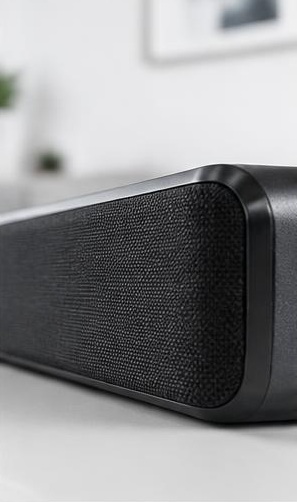
Position the bar according to its manual, usually with the front unobstructed and suitable space around side-firing or upward-firing drivers. A shelf directly above the bar can interfere with designs that send sound upward. A deep cabinet recess can add reflections that blur speech. Moving the bar forward may help more than adding treble.
Check for packaging film, a fabric cover, ornaments, or the television stand blocking the grille. Do not remove permanent acoustic fabric or pry at the mesh. If wall mounting, use the specified hardware and clearances. Never place the bar where it can tip, cover television ventilation, or sit partly unsupported on a narrow furniture edge.
Prevent two systems from competing
Listen close enough to determine whether both the television and soundbar are producing the same program. Slightly delayed duplicates can make voices hollow or indistinct. Select the television's external audio-system output and disable its internal speakers if the manual calls for that arrangement. Avoid using simultaneous outputs as an improvised dialogue boost.
Also check whether a Bluetooth speaker, grouped room speaker, or separate receiver is reproducing the television audio nearby. Multiroom playback is not always synchronized closely enough for overlapping sound in one room. Test with only the soundbar active. If the voices become clearer, correct grouping or routing rather than attempting to equalize the combined sound.
Start from a predictable sound mode
Select a standard, direct, or manufacturer-recommended television mode before comparing enhancements. Names vary, and a mode called Movie may add bass, spatial processing, or reverberation rather than prioritize speech. Turn off optional effects temporarily so you can hear the bar's basic tonal balance.
Then enable one dialogue feature and replay the same scene at approximately the same perceived loudness. Speech enhancement is designed to make voices easier to hear, but its implementation differs by product. Sonos, for example, documents a dedicated Speech Enhancement control for supported home-theater products. sonos.com guidance Keep the setting only if it improves understanding without making voices unnaturally sharp.
Reduce masking bass before boosting treble
If the bar or wireless subwoofer produces heavy bass, reduce bass or subwoofer level a little and listen again. Excess energy in the lower range can make speech seem thick even when higher-frequency detail is present. A subwoofer in a corner may contribute more bass at the seat than expected.
Avoid changing several equalizer bands aggressively. A large treble boost may emphasize hiss and sharp consonants while leaving the underlying muddiness unchanged. If the system offers room tuning, follow its official procedure after placement is settled. Save the previous settings first. Evaluate both male and female voices, since a setting that helps one recording may sound unnatural on another.
Check the format without chasing badges
Compare the affected source with another television app or device. If only one source sounds wrong, inspect its audio-output settings and the selected soundtrack. The television, connection, and soundbar must share a compatible format. A surround badge on screen does not by itself prove that the whole chain is configured correctly.
Temporarily selecting PCM can be a useful compatibility comparison, but it may reduce available surround features depending on the equipment and connection. If PCM makes dialogue normal, investigate supported formats and pass-through settings rather than assuming PCM is always the best permanent choice. Follow the exact manuals because similarly named television settings can behave differently across brands.
Use night mode for large volume swings
If speech is understandable but action scenes are much louder, try night mode or dynamic-range compression. This reduces differences between quieter and louder elements rather than simply making every sound louder. Depending on the product, it may also affect bass or be available only for certain signals.
Test it at the volume you actually use in the evening. Do not compare a quiet compressed version with a much louder unprocessed version and assume the louder one is clearer. Keep subtitles available when needed. A soundbar cannot perfectly isolate every spoken word from every soundtrack, especially when dialogue was mixed under music or intentionally recorded quietly.
Reset selectively and escalate sensibly
If the sound changed after an update or accidental remote press, record the current settings and restore only the relevant audio options first. Check for official firmware updates and restart the television and bar using their documented procedures. A full factory reset should be a later step because it can remove network, remote, and room-tuning settings.
Request support if all sources remain muffled after placement and format checks, especially if one section of the bar sounds absent or distorted. Do not open the enclosure or play loud tones to find a supposedly blocked driver. Provide the model numbers, connection type, affected sources, and settings that changed the result.
Sources
Official guidance on speech controls and source-format troubleshooting: sonos.com guidance ; sonos.com guidance
For placement, available sound modes, and reset instructions, use the exact soundbar and television manuals. Features mentioned here are not available on every model.