Quick answer
Speaker repair kits range from phone opening tools to foam surrounds for large loudspeakers. They are not interchangeable solutions. Describe the actual fault first: silence, muffled sound, a visible tear, a buzzing grille or deteriorating foam. Check routing and playback settings, then inspect the exterior. A kit makes sense only when it contains what the confirmed repair requires. Buying a general collection of tools does not establish the cause of poor sound.
ఈ కథనంలో
Identify the problem before shopping
Speaker repair kits range from phone opening tools to foam surrounds for large loudspeakers. They are not interchangeable solutions. Describe the actual fault first: silence, muffled sound, a visible tear, a buzzing grille or deteriorating foam. Check routing and playback settings, then inspect the exterior. A kit makes sense only when it contains what the confirmed repair requires. Buying a general collection of tools does not establish the cause of poor sound.
Make one change at a time and compare the same short recording afterward. Keep the source, volume and listening position consistent. Otherwise a different track or a louder setting can sound like a successful repair when nothing has changed. A simple note of the symptom, the action taken and the result makes the process easier to follow and gives a technician useful information if you later need help.
Try appropriate free checks first
Restart the source device, disconnect unintended Bluetooth outputs and compare a familiar recording across apps. Speaker Test helps isolate left and right behavior. For light moisture at a phone grille, Water Eject may help move surface droplets once the device is safe to operate. It cannot repair internal liquid damage. Dust Cleaner is a sweep, not a guaranteed way to remove lint. Gently brushing dry exterior debris may be more useful than buying parts.
Check the manufacturer’s instructions for the exact model before applying advice written for another device. Speaker openings, protective meshes and water resistance arrangements vary. An opening that looks like a second speaker may actually serve a microphone or vent. Do not poke it to investigate. If a procedure requires force, unfamiliar chemicals or disassembly that you cannot confidently reverse, pause and choose a safer inspection or professional service instead.
Know the different types of kit
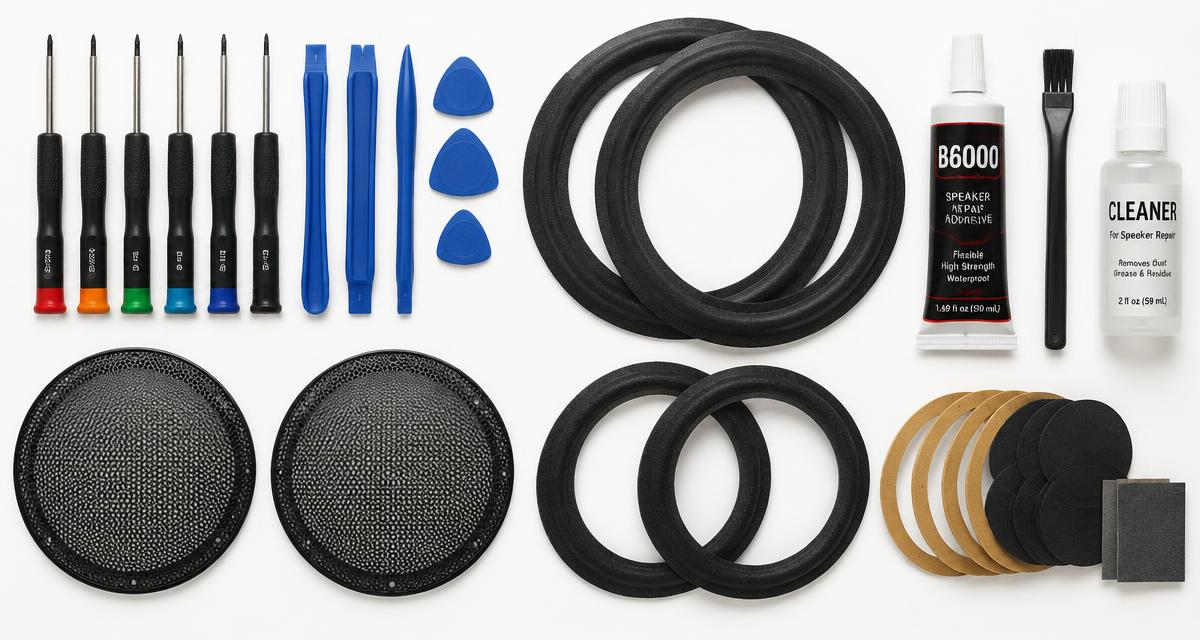
A surround kit usually provides replacement rings and adhesive, sometimes with alignment materials and instructions. A recone kit replaces more of the moving assembly and demands greater skill. Phone tool kits may contain screwdrivers and opening picks but no replacement speaker. Grille repair materials address protection or appearance, not necessarily audio distortion. Read the complete contents list carefully. Product photographs may show tools or speakers that are not included in the purchase.
Use comfortable listening levels throughout the checks. Keep test tones away from your ears and avoid long sessions simply because improvement is slow. More volume is not a stronger cleaning treatment. Stop if the device develops unusual heat, severe distortion or a new mechanical noise. A short test should answer a specific question; once it has answered that question, silence the tone and decide what to do next.
Match parts to the exact speaker
Record the brand, model and any revision details before measuring. Surround compatibility involves inner and outer dimensions, profile and cone attachment style, not just the nominal speaker diameter. Phone speaker modules can differ between closely named models. For complete home speaker drivers, impedance and enclosure behavior also matter. Ask the supplier to confirm compatibility when measurements are ambiguous. Avoid trimming a poorly matched part simply because its advertised size looks close.
A browser tool depends on the playback path selected by your device. Before interpreting a result, confirm that Bluetooth headphones, a dock or another output have not taken over. Start playback with the on screen control, then check the appropriate volume setting. If the browser remains silent, try familiar audio elsewhere. A silent web page by itself does not establish that a physical speaker has failed.
Evaluate adhesive and instructions
Use adhesive intended for the materials and repair described by the manufacturer. A glue suitable for one surround may not suit another. Check application, ventilation and curing instructions before starting, and do not assume that every speaker adhesive remains equally flexible. Good instructions explain alignment and how to remove old material without damaging the cone. If the listing omits those details, obtain them before purchase rather than improvising once the driver is disassembled.
Do not treat a change in sound as proof that all damage is gone. A device can play normally while an unrelated electrical or charging problem remains. Watch for warnings and follow the relevant safety instructions before reconnecting power. Likewise, a faint low note may simply be outside a small speaker’s useful range. Judge recovery using ordinary speech and familiar music as well as controlled tones.
Understand phone opening risks
Opening a phone can damage display cables, compromise water resistance and expose the battery. Plastic picks reduce some scratching risks but do not make the procedure safe by themselves. A full repair may require replacement seals, model specific tools and careful handling of adhesives. Never pry against or puncture a battery. If the device is swollen, hot or liquid damaged, stop and seek professional help. Check warranty and service options before choosing a do it yourself route.
If you need service, describe the event and the remaining symptoms accurately. Explain whether there was liquid, impact, an update or gradual deterioration, and list the checks already attempted. Ask what the proposed repair includes and whether any seals or protective parts need replacement. A clear diagnosis and written estimate are more useful than ordering a part because someone else reported a similar sounding problem online.
Set up a controlled workspace
Work on an uncluttered surface with good light and a way to organize screws. Photograph each stage if you undertake a suitable repair. Disconnect equipment as required and keep liquids away. Do not open a powered speaker’s mains amplifier; stored electrical energy can remain dangerous. For surround work, protect the voice coil gap from debris and follow the kit’s alignment method. Rushing the cleanup stage can cause more trouble than the original deterioration.
Test only after the repair is ready
Observe the stated adhesive curing period before playback. Begin with quiet familiar audio, then use Speaker Test or Tone Generator briefly to check for obvious imbalance or buzzing. Subwoofer Test provides 20 to 200 Hz signals for suitable bass equipment, but start low and avoid large cone excursions. A clean test at one pitch is not proof of complete restoration. If scraping or severe distortion appears, stop and review the procedure with the supplier or a technician.
Quick answers
Does every muffled phone need a kit? No, settings or exterior blockage may explain it. Can glue repair a burned voice coil? No. Is a surround kit the same as a recone kit? No. Will opening a phone preserve water resistance automatically? No. Is professional repair always more expensive? Not necessarily after tools, parts and risk are included. Should I buy by diameter alone? No, confirm exact compatibility.