Quick answer
A stereo left and right test sends sound to one channel at a time so you can confirm where each channel actually plays. It can reveal reversed connections, accidental mono playback, a balance setting pushed sideways, or a missing output. It cannot establish accurate speaker sensitivity, measure headphone frequency response, or diagnose your hearing. Treat it as a routing check followed by a controlled listening comparison.
Σε αυτό το άρθρο
- What a stereo test can tell you
- Prepare a predictable playback path
- Start quietly and verify each channel
- Fix reversed channels at the correct point
- Investigate a silent or quieter side
- Use a mono voice to check the center image
- Do not confuse polarity with channel balance
- Make comparisons repeatable
- Know when to stop troubleshooting
- Sources
What a stereo test can tell you
A stereo left and right test sends sound to one channel at a time so you can confirm where each channel actually plays. It can reveal reversed connections, accidental mono playback, a balance setting pushed sideways, or a missing output. It cannot establish accurate speaker sensitivity, measure headphone frequency response, or diagnose your hearing. Treat it as a routing check followed by a controlled listening comparison.
Left and right refer to your perspective while facing the speakers or wearing headphones normally. A speaker on your left should reproduce the left channel. Before starting, identify the physical left and right outputs, headphone markings, and any receiver channel labels. This prevents a labeling mistake from looking like an equipment fault.
Prepare a predictable playback path
Choose one playback device and verify its selected audio output. Disconnect unused Bluetooth devices, close other audio applications, and pause notifications where practical. On a receiver, select a straightforward stereo mode rather than surround upmixing. On a computer or phone, temporarily disable spatial effects, virtual surround, and automatic sound enhancements. Record existing settings so you can restore them afterward.
Check accessibility settings for mono audio and left-right balance. Mono audio deliberately combines channels and can make both sides play during a channel test. Center the balance control. If you use an external interface, inspect its mixer application too: a browser may send stereo correctly while the interface duplicates or redirects its outputs.
Start quietly and verify each channel
Set playback volume low before starting any test. Use a spoken channel identification track or a brief, quiet midrange signal rather than sustained bass or piercing treble. Raise the level only enough to identify the sound comfortably. Device volume percentages do not correspond to a universal sound pressure level, so a particular percentage is not a safety guarantee.
Play left only, stop, and then play right only. Repeat once if necessary. With headphones, sound should come predominantly from the marked earcup. With speakers, you will hear the active speaker through both ears because sound crosses the room; the other cabinet should not itself be producing the same test signal. Do not put your ear close to a tweeter to investigate.
Fix reversed channels at the correct point
If left plays from the right speaker and right plays from the left, first check whether the speakers or headphone cups are simply reversed. Next inspect connections from the source through the amplifier to the speakers. A red and white RCA pair identifies right and left respectively on conventional stereo connections, but always follow the equipment labels rather than cable color alone.
Power down equipment before moving analog or speaker connections. Swap the misplaced left and right connections at one appropriate point, then repeat the test. Do not swap positive and negative speaker terminals to exchange channels: terminal polarity and channel assignment are different issues. For digital or wireless systems, look for a channel assignment setting in the manufacturer's application.
Investigate a silent or quieter side
If a channel is silent, confirm balance, mute controls, and connector seating before blaming the speaker. A partially inserted headphone plug can cause missing channels or unusual cancellation. Remove adapters that are not necessary and try a known-good cable or output. For wireless earbuds, check battery status and reconnection instructions because each earbud may have a separate connection or charging problem.
For speakers, switch the system off before exchanging left and right signal cables. Repeat the quiet test after powering up. If the fault moves, investigate the upstream source, cable, or amplifier channel. If it remains with one speaker, investigate that cabinet and its connection. Change only one element at a time, and never disconnect or reconnect bare speaker wire while the amplifier is operating.
Use a mono voice to check the center image
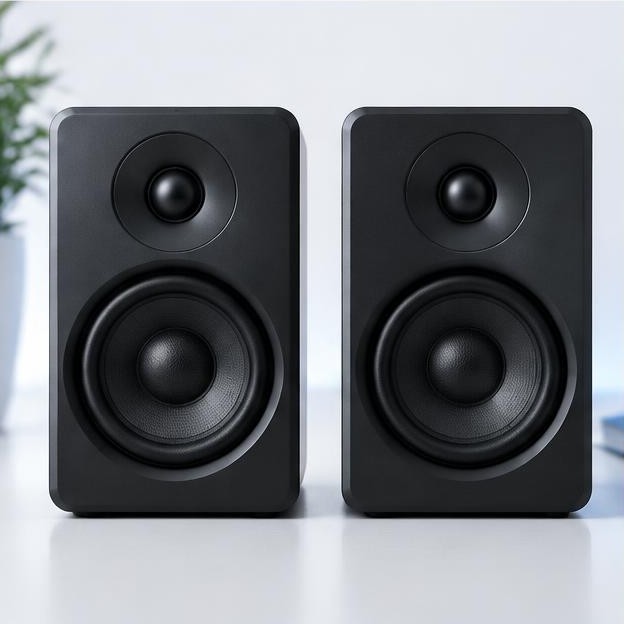
Once routing works, play a familiar mono voice through both speakers. Sit midway between them, approximately the same distance from each. A stable voice should generally appear between the speakers rather than attached to one cabinet. Genelec recommends a symmetrical setup with the speakers and listener forming an equilateral triangle as a useful starting point. genelec.com guidance
A drifting center image does not automatically mean mismatched speakers. Unequal listening distances, a nearby side wall, an open doorway, or different speaker angles can shift the apparent position. Check geometry before changing channel gain. With headphones, reseat both cups or earbuds first; an uneven seal can change bass balance and make the presentation seem tilted.
Do not confuse polarity with channel balance
A polarity reversal means that one electrical signal is inverted relative to the other. With loudspeakers, an accidental reversal at one cabinet can weaken central bass and produce a diffuse image when both channels reproduce the same material. However, room reflections can create similar impressions. A listening observation alone is not enough to prove a wiring error.
Switch off the amplifier and visually trace each speaker cable. Follow the marked conductor consistently from the amplifier's positive terminal to the speaker's positive terminal, and likewise for negative. Never open an amplifier or probe its internal circuitry. Some active and digitally managed systems intentionally use internal polarity relationships; leave those alone and follow the manufacturer's setup procedure.
Make comparisons repeatable
Keep the same seat, volume, signal, and processing settings while comparing channels. For headphones, remove and reseat them between trials to see whether the apparent imbalance changes with fit. If practical, compare a second known-good pair on the same source, then test the original pair on another source. This small comparison grid is more useful than repeating an increasingly loud tone.
Write down the exact result: reversed channels, silence on one side, imbalance only with bass, or imbalance only at one seat. Stop if you notice discomfort, ringing, or muffled hearing. Noise can damage hearing through excessive level, duration, or both, and audible discomfort is not a reliable advance warning. nidcd.nih.gov guidance
Know when to stop troubleshooting
Seek equipment service when a fault consistently stays with one component after safe cable and source substitutions. Seek qualified hearing advice if an imbalance seems present across unrelated devices or comes with hearing symptoms; a browser channel test is not a clinical assessment. Sudden hearing changes deserve prompt medical attention rather than repeated online testing. Restore your preferred listening settings only after documenting the clean stereo result.
Sources
Genelec, Studio Monitor Placement: genelec.com guidance
National Institute on Deafness and Other Communication Disorders, Noise-Induced Hearing Loss: nidcd.nih.gov guidance